Cicada3301 Ransomware (Repellent Scorpius) — Complete CTI Report: Rust-Based RaaS Targeting ESXi, CVE Arsenal, IOCs & Full Defensive Playbook
Comprehensive Cyber Threat Intelligence report on Cicada3301 (Repellent Scorpius) — a Rust-based RaaS with ALPHV/BlackCat code overlap targeting Windows, Linux/ESXi, NAS, and PowerPC. Full MITRE ATT&CK TTP mapping, CVE arsenal, confirmed IOCs, YARA & Sigma rules, and a complete defensive playbook.
Executive Summary
Cicada3301 — tracked by Palo Alto Unit 42 as Repellent Scorpius — is a Ransomware-as-a-Service (RaaS) operation first observed in May 2024 (public DLS activity from June 2024). The group is notable for multiple technically sophisticated characteristics that distinguish it from commodity ransomware:
- Written in Rust — rare among ransomware groups; ensures performance, memory safety, and cross-platform compilation
- Multi-platform targeting — Windows, Linux, VMware ESXi, NAS devices, and even PowerPC architectures
- Significant code overlap with ALPHV/BlackCat — suggesting a rebrand, fork, or shared developer pool following BlackCat’s shutdown
- ChaCha20 + RSA hybrid encryption — same algorithm family as BlackCat
- ESXi-specialized commands — dedicated
linux_encfunction withsnapshot.removealland VM shutdown capabilities - 7-character random extension appended to encrypted files (e.g.,
payroll.xlsx.f11a46a1) - Brutus botnet nexus — linked to mass VPN brute-forcing campaign targeting FortiGate, Cisco, Citrix appliances
| Attribute | Detail |
|---|---|
| Group Name | Cicada3301 / Repellent Scorpius (Unit 42) |
| First Seen | May 2024 (DLS: June 25, 2024) |
| Status | 🔴 ACTIVE |
| Language | Rust (64-bit binary) |
| Encryption | ChaCha20 (files) + RSA (key wrap) |
| Extension | +7 random chars (e.g., .f11a46a1) |
| Ransom Note | RECOVER-[ext]-DATA.txt |
| Platforms | Windows · Linux/ESXi · NAS · PowerPC |
| ALPHV Nexus | Code overlap confirmed (Truesec, Unit 42) |
| Affiliate Model | RaaS — 20% commission via RAMP forum |
| CIS Countries | ❌ Prohibited by group policy |
Logo & Brand Identity
The group co-opts the name and aesthetic of the original Cicada 3301 cryptographic puzzle series (2012–2014). There is no connection to the original puzzle — this is brand theft to add mystique to the criminal operation.
Attack Kill Chain Diagram
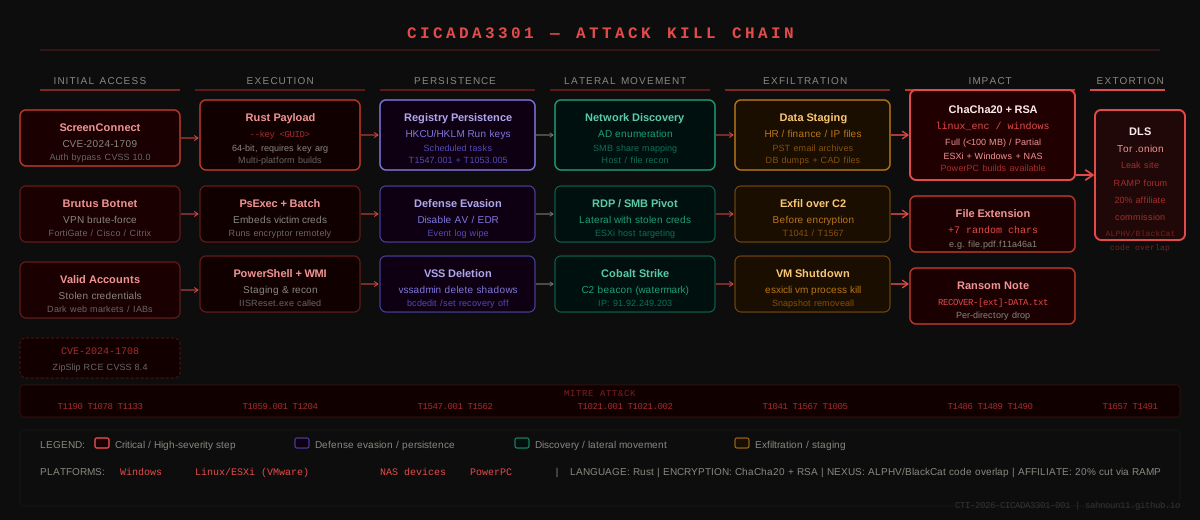
Full attack kill chain: Initial access via ScreenConnect CVEs / Brutus botnet → Rust payload execution → Persistence / defense evasion → Discovery + lateral movement → Pre-encryption data exfiltration → ChaCha20+RSA encryption across all platforms → DLS publication and ransom demand.
RaaS Operational Schema
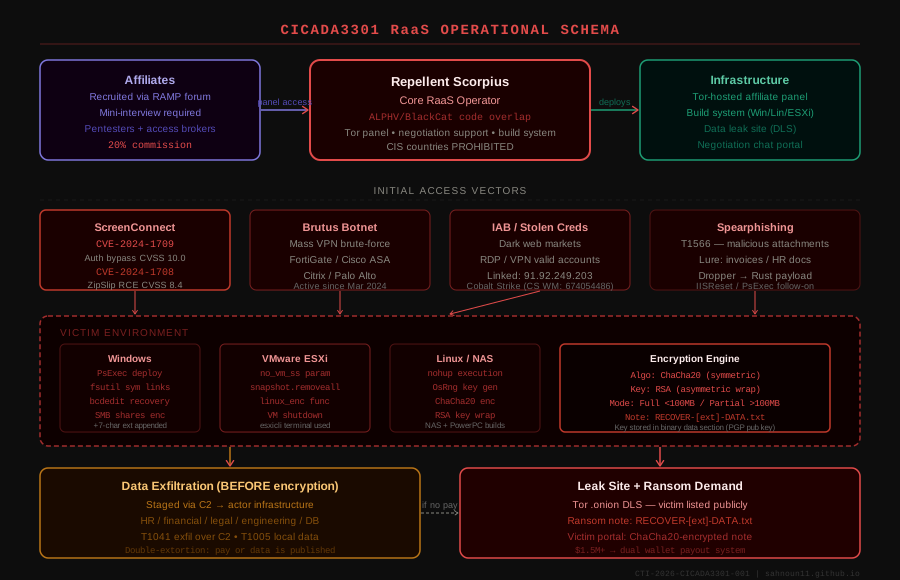
The full RaaS ecosystem: Repellent Scorpius core operator provides affiliates with Tor-hosted panel, multi-platform build system, and negotiation support. Affiliates access victims via ScreenConnect CVEs, Brutus botnet credential compromise, or purchased IAB access.
ALPHV/BlackCat Connection
Analysis reveals significant code similarities between Cicada3301 and the ALPHV ransomware — both are written in Rust, use ChaCha20 for encryption, use similar commands to shutdown VMs and remove snapshots, and share the same UI parameter for graphic encryption output and similar file naming conventions, changing only “RECOVER-[ext]-FILES.txt” to “RECOVER-[ext]-DATA.txt”.
It is unclear whether this means that the threat actor previously operated using differently branded ransomware, or whether they have purchased or inherited data from other ransomware groups. Three hypotheses exist:
- Rebrand — a subset of former ALPHV/BlackCat operators relaunched as Cicada3301 after BlackCat’s collapse
- Fork — an independent group obtained and modified ALPHV source code
- Shared developer — the malware developer behind ALPHV worked with the new group
Analyst Assessment: The code overlap is too precise for coincidence. The most likely scenario is that one or more ALPHV developers participated in Cicada3301’s development, either as a rebrand or contracted basis. The timing — Cicada3301 emerging as ALPHV dissolved — strongly supports this.
Technical Analysis — The Rust Payload
Binary Characteristics
The ransomware is a 64-bit binary written in Rust which accepts command-line arguments. The binary performs a key validation routine, in which it attempts to decrypt an embedded ransom note using the ChaCha20 stream cipher. The ransomware note is Base64-decoded. The encryptor requires a key parameter to begin execution.
Command-Line Parameters (via clap::args library):
| Parameter | Function |
|---|---|
--key <GUID> | Required — without valid key, ransomware will not execute |
--sleep <seconds> | Delays execution by specified seconds (evasion) |
--ui | Displays real-time encryption progress and statistics |
--no_vm_ss | Encrypts ESXi files without shutting down running VMs |
--paths <list> | Target specific directory paths (batch script driven) |
Encryption Process (Step by Step)
The encryption process is composed of two sequences. First, the encryptor reads the contents of the target file, encrypts using ChaCha20 with a randomly generated key secret and nonce bytes, and writes the result back to the file. Second, the ChaCha20 key and nonce are encrypted using a hard-coded RSA public key, and the result is appended to the file. Finally, the extension is appended to the end of the encrypted data.
1
2
3
4
5
6
7
8
9
10
11
12
13
ENCRYPTION FLOW:
━━━━━━━━━━━━━━━━━━━━━━━━━━━━━━━━━━━━━━━━━━━━━━━━━━━━
1. OsRng generates random ChaCha20 key + nonce
2. File content → encrypted with ChaCha20
3. ChaCha20 key/nonce → encrypted with embedded RSA public key (PGP)
4. Encrypted key blob appended to file
5. 7-char random extension appended: filename.ext.XXXXXXX
6. RECOVER-[XXXXXXX]-DATA.txt dropped in same directory
━━━━━━━━━━━━━━━━━━━━━━━━━━━━━━━━━━━━━━━━━━━━━━━━━━━━

FILE SIZE LOGIC:
  < 100 MB  →  Full file encryption
  > 100 MB  →  Intermittent/partial encryption (speed optimization)
ESXi-Specific Capabilities
Its primary function linux_enc encrypts files using the ChaCha20 stream cipher. If the no_vm_ss parameter is chosen, the ransomware encrypts files without shutting down VMs running on ESXi. To do this, it uses the built-in esxicli terminal, which also removes snapshots.
1
2
3
4
5
# ESXi commands executed by Cicada3301
esxicli vm process kill --type=force --world-id=<VMID>
vim-cmd vmsvc/snapshot.removeall <VMID>
# Alternative shutdown approach:
esxicli --formatter=csv --format-param=fields="World ID" vm process list
Windows-Specific Actions
Cicada3301’s similarities with BlackCat extend to its use of ChaCha20 for encryption, fsutil to evaluate symbolic links and encrypt redirected files, as well as IISReset.exe to stop IIS services and encrypt files that may otherwise be locked. Other overlaps include steps to delete shadow copies, disable system recovery by manipulating bcdedit, increase the MaxMpxCt value to support higher SMB/PsExec request volumes, and clear all event logs.
1
2
3
4
5
6
7
8
9
10
11
12
13
14
15
16
17
18
# Shadow copy deletion
vssadmin delete shadows /all /quiet
wmic shadowcopy delete

# Disable system recovery
bcdedit /set {default} recoveryenabled No
bcdedit /set {default} bootstatuspolicy ignoreallfailures

# IIS service stop (unlock files)
iisreset /stop

# Event log wipe
wevtutil cl System
wevtutil cl Security
wevtutil cl Application

# SMB tuning for mass PsExec deployment
reg add HKLM\SYSTEM\CurrentControlSet\Services\LanmanServer\Parameters /v MaxMpxCt /t REG_DWORD /d 65535 /f
CVE Arsenal — Confirmed Initial Access Vectors
Cicada3301 provides affiliates with a Rust-based locker, a Tor-hosted management panel, negotiation support, and multi-platform ransomware builds for Windows, Linux, ESXi, NAS, and even PowerPC environments. The group recruits pentesters and access advertisers via the RAMP underground forum.
| CVE | CVSS | Product | Type | Status |
|---|---|---|---|---|
| CVE-2024-1709 | 10.0 | ConnectWise ScreenConnect ≤23.9.7 | Authentication Bypass | 🔴 CISA KEV — exploited by Cicada3301 |
| CVE-2024-1708 | 8.4 | ConnectWise ScreenConnect ≤23.9.7 | Path Traversal / ZipSlip RCE | 🔴 CISA KEV — chained with -1709 |
| CVE-2024-40766 | 9.3 | SonicWall SSLVPN | Access Control Bypass | 🟠 Ransomware initial access vector |
| CVE-2024-21887 | 9.1 | Ivanti Connect Secure | Command Injection | 🟠 Mass exploitation Q1 2024 |
| CVE-2023-46805 | 8.2 | Ivanti Connect Secure | Authentication Bypass | 🟠 Chained with CVE-2024-21887 |
| CVE-2023-20269 | Medium | Cisco ASA / FTD VPN | Brute Force Weakness | 🟡 Brutus botnet target |
| CVE-2022-40684 | 9.8 | Fortinet FortiOS / FortiProxy | Auth Bypass | 🟡 Brutus botnet target |
CVE-2024-1709 Deep Dive — The Perfect 10
CVE-2024-1709 is a remote code execution vulnerability with a CVSSv3 score of 10.0 (critical). CVE-2024-1708 is a path traversal vulnerability with a CVSSv3 score of 8.4 (high). On February 21, researchers uploaded a proof-of-concept exploit to GitHub, and approximately 7 hours later a module to exploit CVE-2024-1709 was made available in the Metasploit framework, making this flaw easily exploitable by threat actors of all skill levels.
Exploitation chain:
1
2
3
4
5
6
7
8
9
10
11
12
13
Step 1 — CVE-2024-1709 (Auth Bypass, CVSS 10.0):
  URL manipulation bypasses authentication entirely
  Attacker creates rogue admin account (e.g., "admin" / "flash")
  → Unauthenticated access to ScreenConnect admin panel

Step 2 — CVE-2024-1708 (ZipSlip RCE, CVSS 8.4):
  Attacker uploads malicious .zip "extension" via admin panel
  ScreenConnect.ZipFile.ExtractAllEntries() extracts without path validation
  Malicious files (webshell / RAT / encryptor) dropped to:
  → C:\Program Files (x86)\ScreenConnect\App_Extensions\

Combined Result: Full unauthenticated RCE on ScreenConnect server
Post-exploitation: Cobalt Strike beacon → Cicada3301 Rust payload
Patch requirement: Upgrade ScreenConnect to version 23.9.8 or later. No workaround exists for exposed unpatched servers — take offline immediately if patching is not immediately possible.
MITRE ATT&CK TTP Mapping (v15)
| Tactic | ID | Technique | Cicada3301 Implementation |
|---|---|---|---|
| Initial Access | T1190 | Exploit Public-Facing App | CVE-2024-1709/1708 ScreenConnect chain |
| Initial Access | T1078 | Valid Accounts | Brutus botnet harvested VPN creds |
| Initial Access | T1566.001 | Spearphishing Attachment | Malicious docs → payload dropper |
| Execution | T1204.002 | Malicious File | Rust binary requires --key param |
| Execution | T1059.001 | PowerShell | Staging, recon, pre-encryption tasks |
| Execution | T1059.003 | Windows Command Shell | vssadmin, bcdedit, wevtutil, iisreset |
| Execution | T1569.002 | Service Execution (PsExec) | PsExec with embedded victim credentials |
| Persistence | T1547.001 | Registry Run Keys | HKCU/HKLM Run key persistence |
| Persistence | T1053.005 | Scheduled Task | Timed payload execution |
| Privilege Escalation | T1055 | Process Injection | Injection for elevated context |
| Privilege Escalation | T1068 | Exploit for PrivEsc | Local vulnerability to SYSTEM |
| Defense Evasion | T1562.001 | Disable Security Tools | AV/EDR termination pre-encryption |
| Defense Evasion | T1070.001 | Clear Windows Event Logs | wevtutil cl System/Security/Application |
| Defense Evasion | T1036 | Masquerading | Payload mimics legitimate software |
| Credential Access | T1003 | OS Credential Dumping | Credential harvesting for lateral movement |
| Discovery | T1083 | File & Directory Discovery | Maps HR, financial, engineering files |
| Discovery | T1018 | Remote System Discovery | Network/share enumeration |
| Discovery | T1069.002 | Domain Groups | AD privileged account enumeration |
| Lateral Movement | T1021.001 | RDP | Pivot with stolen credentials |
| Lateral Movement | T1021.002 | SMB / Admin Shares | Mass deployment via PsExec + SMB |
| Collection | T1005 | Data from Local System | HR, finance, engineering, PST files |
| Collection | T1114.001 | Email Collection — Local | Outlook PST archive harvesting |
| Exfiltration | T1041 | Exfiltration Over C2 | Data sent before encryption |
| Exfiltration | T1567 | Exfiltration to Web Service | Actor-operated endpoints |
| Impact | T1486 | Data Encrypted for Impact | ChaCha20 + RSA, Full + Partial modes |
| Impact | T1489 | Service Stop | VM shutdown, IIS stop, DB services |
| Impact | T1490 | Inhibit System Recovery | VSS deletion, bcdedit recovery disable |
| Impact | T1657 | Financial Theft | Extortion via DLS and ransom demand |
Threat Actor Profile
Cicada3301 is a cybercrime group operating a RaaS operation since May 2024. The group uses custom malware that shares code with BlackCat Ransomware, suggesting possible collaboration with the now-inactive BlackCat operation. Cicada3301 maintains a presence on several Russian-based dark web hacking forums, which they use to recruit cybercriminals. They primarily target organizations in the US and UK, having claimed 30 victims during their first three months of operation.
Targeted Sectors
Cicada3301 has been observed targeting small to medium-sized businesses (SMBs) in the construction, IT, legal services, retail, healthcare, transportation, telecommunications, hospitality, finance, real estate, and manufacturing sectors.
| Sector | Risk Level |
|---|---|
| Manufacturing | 🔴 CRITICAL |
| Healthcare | 🔴 CRITICAL |
| Legal Services | 🟠 HIGH |
| IT / Technology | 🟠 HIGH |
| Finance | 🟠 HIGH |
| Construction / Engineering | 🟠 HIGH |
| Transportation / Logistics | 🟡 MEDIUM-HIGH |
| Retail | 🟡 MEDIUM-HIGH |
| Telecommunications | 🟡 MEDIUM |
| Hospitality / Real Estate | 🟡 MEDIUM |
Targeted Countries
Confirmed targeting: United States (primary), United Kingdom (primary), Australia, Canada, Italy, France, Germany, Japan, Belgium, Spain, and 5+ additional countries. CIS countries explicitly excluded by affiliate program policy.
RaaS Affiliate Structure
On June 29, 2024, a user named “Cicada3301” started an affiliate program on the popular underground dark web forum “RAMP”. The topic states that Cicada3301 is seeking pentesters and access advertisers, requiring a “mini-interview” as a prerequisite. Operations in CIS countries are strictly prohibited. The affiliate program commission is 20% of the total payout. For payouts exceeding $1.5 million USD, two wallets are provided: one for the affiliate, and one for the program. Panel access must not be shared with third parties without support approval.
Indicators of Compromise (IOCs)
Network Infrastructure
1
2
3
4
5
6
7
# ── Confirmed C2 / Operational IP ────────────────────────────────────────────
91.92.249.203          [Brutus botnet / Cicada3301 initial access]
                       [Previously linked: Cobalt Strike watermark 674054486]
                       [Previously linked: Nokoyawa + ALPHV/BlackCat (2023)]

# ── Cobalt Strike ─────────────────────────────────────────────────────────────
Cobalt Strike watermark: 674054486
File System Artifacts
1
2
3
4
5
6
7
8
9
10
11
12
13
# Ransom note — per-directory drop — CRITICAL alert trigger
RECOVER-[7-char-ext]-DATA.txt
e.g.: RECOVER-f11a46a1-DATA.txt

# Encrypted file pattern — 7 random chars appended
[original_name].[original_ext].[7 random chars]
e.g.: payroll.xlsx.f11a46a1
      database.bak.a3c92f1b
      design.dwg.8e4b77c2

# Batch script pattern
[encryptor_binary] --key <GUID> --paths <target_dirs>
(multiple invocations against hard-coded directory list)
Malware Hashes (Representative Samples)
1
2
3
4
5
6
7
8
9
10
# ESXi/Linux variant (Truesec analysis — August 2024)
Type: ELF 64-bit, Rust, ChaCha20+RSA
Key strings: linux_enc, no_vm_ss, snapshot.removeall, nohup

# Windows variant (Unit 42 analysis — September 2024)
Type: PE 64-bit, Rust, ChaCha20+RSA
Key strings: PsExec embed, fsutil, IISReset, wevtutil, bcdedit
Key feature: embeds victim credentials for PsExec deployment

# Note: specific hashes rotate per affiliate build — use behavioral YARA
Command Signatures (Hunt Queries)
1
2
3
4
5
6
7
8
9
10
11
12
13
14
15
16
17
18
19
20
21
22
# VSS deletion (pre-encryption step)
vssadmin delete shadows /all /quiet
wmic shadowcopy delete

# Recovery disable
bcdedit /set {default} recoveryenabled No
bcdedit /set {default} bootstatuspolicy ignoreallfailures

# Event log wipe
wevtutil cl System
wevtutil cl Security
wevtutil cl Application

# SMB MaxMpxCt tuning (PsExec mass deployment indicator)
reg add HKLM\SYSTEM\CurrentControlSet\Services\LanmanServer\Parameters /v MaxMpxCt

# ESXi VM shutdown + snapshot removal
esxicli vm process kill --type=force
vim-cmd vmsvc/snapshot.removeall

# IIS stop (file unlock)
iisreset /stop
Detection Rules
YARA — Cicada3301 ESXi Variant
1
2
3
4
5
6
7
8
9
10
11
12
13
14
15
16
17
18
19
20
21
22
23
24
25
26
27
28
29
30
31
32
33
34
35
36
37
38
39
40
41
42
43
44
45
46
47
48
49
50
51
52
53
54
55
56
57
58
59
60
61
62
63
64
65
66
67
rule ELF_Cicada3301_ESXi {
    meta:
        author      = "CTI Team — Nicklas Keijser (Truesec)"
        date        = "2024-08-31"
        description = "Detect Cicada3301 ESXi/Linux ransomware variant"
        tlp         = "AMBER"
        reference   = "CTI-2024-CICADA3301-001"
        mitre       = "T1486, T1490, T1489"

    strings:
        $s1 = "no_vm_ss"          nocase wide ascii
        $s2 = "linux_enc"         nocase wide ascii
        $s3 = "nohup"             nocase wide ascii
        $s4 = "snapshot.removeall" nocase wide ascii
        $chacha20 = { 65 78 70 61 6E 64 20 33 32 2D 62 79 74 65 20 6B }
                     // ChaCha20 constant "expand 32-byte k"

    condition:
        uint16(0) == 0x457F        // ELF magic
        and filesize < 10000KB
        and all of ($s*)
        and $chacha20
}

rule PE_Cicada3301_Windows {
    meta:
        author      = "CTI Team"
        date        = "2024-09-10"
        description = "Detect Cicada3301 Windows ransomware variant"
        tlp         = "AMBER"
        mitre       = "T1486, T1490, T1489, T1569.002"

    strings:
        $note_fmt   = "RECOVER-" ascii wide
        $note_data  = "-DATA.txt" ascii wide
        $vss1       = "vssadmin delete shadows" ascii wide nocase
        $vss2       = "wmic shadowcopy delete"  ascii wide nocase
        $bcdedit    = "recoveryenabled" ascii wide nocase
        $iisreset   = "iisreset" ascii wide nocase
        $wevtutil   = "wevtutil cl" ascii wide nocase
        $maxmpxct   = "MaxMpxCt" ascii wide
        $rust_str   = "Rust" ascii
        $cargo_str  = "Cargo" ascii

    condition:
        uint16(0) == 0x5A4D        // PE magic
        and ($note_fmt and $note_data)
        and 3 of ($vss1, $vss2, $bcdedit, $iisreset, $wevtutil, $maxmpxct)
        and 1 of ($rust_str, $cargo_str)
}

rule Cicada3301_Ransom_Note {
    meta:
        description = "Detect Cicada3301 ransom note file — CRITICAL"
        level       = "critical"

    strings:
        $fn1 = "RECOVER-"    ascii wide
        $fn2 = "-DATA.txt"   ascii wide
        $tor  = ".onion"     ascii
        $enc  = "encrypted"  ascii wide nocase
        $key  = "key"        ascii wide nocase

    condition:
        ($fn1 and $fn2 and $tor)
        or ($fn1 and $fn2 and 2 of ($enc, $key))
}
Sigma — Ransom Note Creation (CRITICAL)
1
2
3
4
5
6
7
8
9
10
11
12
13
14
15
16
17
18
19
20
21
title: Cicada3301 Ransomware Note Creation
id: e3f9a2b1-c4d5-6e78-9f0a-b1c2d3e4f5a6
status: stable
description: >
  Detects creation of Cicada3301 ransom note RECOVER-*-DATA.txt.
  Trigger immediate host isolation — no false positives expected.
author: CTI Team — CTI-2024-CICADA3301-001
tags:
  - attack.impact
  - attack.t1486
logsource:
  category: file_event
  product: windows
detection:
  selection:
    TargetFilename|contains|all:
      - "RECOVER-"
      - "-DATA.txt"
  condition: selection
falsepositives: []
level: critical
Sigma — VSS + Recovery Disable (HIGH)
1
2
3
4
5
6
7
8
9
10
11
12
13
14
15
16
17
18
19
20
21
22
23
24
25
26
27
28
29
30
title: Cicada3301 Pre-Encryption System Recovery Sabotage
id: f4a0b3c2-d5e6-7f89-0a1b-c2d3e4f5a6b7
status: stable
description: Detects VSS deletion and recovery disable — Cicada3301 pre-encryption steps
tags:
  - attack.impact
  - attack.t1490
logsource:
  category: process_creation
  product: windows
detection:
  vss_admin:
    CommandLine|contains|all:
      - "vssadmin"
      - "delete"
      - "shadows"
  vss_wmic:
    CommandLine|contains|all:
      - "wmic"
      - "shadowcopy"
      - "delete"
  bcd_recovery:
    CommandLine|contains|all:
      - "bcdedit"
      - "recoveryenabled"
      - "no"
  condition: 1 of vss_* or bcd_recovery
falsepositives:
  - Approved backup software maintenance
level: high
Sigma — Event Log Wipe (HIGH)
1
2
3
4
5
6
7
8
9
10
11
12
13
14
15
16
17
18
title: Cicada3301 Event Log Clearing
id: a5b1c4d3-e6f7-8a90-1b2c-d3e4f5a6b7c8
status: stable
description: Detects wevtutil event log clearing — Cicada3301 forensic evasion (T1070.001)
tags:
  - attack.defense_evasion
  - attack.t1070.001
logsource:
  category: process_creation
  product: windows
detection:
  selection:
    Image|endswith: "\\wevtutil.exe"
    CommandLine|contains: " cl "
  condition: selection
falsepositives:
  - Approved security operations (verify with change log)
level: high
Sigma — MaxMpxCt Registry Modification (PsExec Mass Deploy Indicator)
1
2
3
4
5
6
7
8
9
10
11
12
13
14
15
16
17
18
19
20
title: Cicada3301 SMB MaxMpxCt Modification for PsExec Deployment
id: b6c2d5e4-f7a8-9b01-2c3d-e4f5a6b7c8d9
status: experimental
description: >
  Detects MaxMpxCt registry increase — Cicada3301 prepares for mass
  PsExec deployment with embedded credentials across the network.
tags:
  - attack.lateral_movement
  - attack.t1021.002
logsource:
  category: registry_set
  product: windows
detection:
  selection:
    TargetObject|contains: "LanmanServer\\Parameters"
    TargetObject|endswith: "MaxMpxCt"
  condition: selection
falsepositives:
  - Legitimate high-volume SMB configuration changes
level: high
Sigma — ESXi Snapshot Removal (Critical for VMware environments)
1
2
3
4
5
6
7
8
9
10
11
12
13
14
15
16
17
18
19
20
21
22
23
title: Cicada3301 ESXi Snapshot Removal
id: c7d3e6f5-a8b9-0c12-3d4e-f5a6b7c8d9e0
status: experimental
description: >
  Detects esxicli snapshot removal commands — Cicada3301 pre-encryption
  step on VMware ESXi environments before VM shutdown and encryption.
tags:
  - attack.impact
  - attack.t1490
logsource:
  category: process_creation
  product: linux
detection:
  selection_snapshot:
    CommandLine|contains: "snapshot.removeall"
  selection_vmkill:
    CommandLine|contains|all:
      - "esxicli"
      - "vm process kill"
  condition: 1 of selection_*
falsepositives:
  - Approved VM lifecycle management operations
level: critical
Encrypted File Pattern Detection
This section is dedicated to detecting Cicada3301’s signature file renaming behavior — the 7-character random hexadecimal extension appended to every encrypted file. This is one of the most reliable forensic signatures of this group and enables both live detection and post-incident scoping.
Pattern Anatomy
1
2
3
4
5
6
7
8
9
10
11
12
13
14
15
16
17
18
19
20
21
22
ORIGINAL FILE:          payroll.xlsx
AFTER ENCRYPTION:       payroll.xlsx.f11a46a1

ORIGINAL FILE:          backup.sql
AFTER ENCRYPTION:       backup.sql.a3c92f1b

ORIGINAL FILE:          design_v2.dwg
AFTER ENCRYPTION:       design_v2.dwg.8e4b77c2

RANSOM NOTE:            RECOVER-f11a46a1-DATA.txt
                        RECOVER-a3c92f1b-DATA.txt
                        RECOVER-8e4b77c2-DATA.txt

PATTERN (Regex):        ^.+\.[a-f0-9]{8}$
NOTE PATTERN (Regex):   ^RECOVER-[a-f0-9]{8}-DATA\.txt$

KEY OBSERVATION:
  - Extension is always exactly 8 lowercase hexadecimal characters
  - Same extension used for ALL files in a given encryption run
  - Ransom note filename contains the SAME extension string
  - This means: if you see RECOVER-XXXXXXXX-DATA.txt,
    ALL encrypted files in that directory end with .XXXXXXXX
YARA — Encrypted File Rename Pattern Detection
1
2
3
4
5
6
7
8
9
10
11
12
13
14
15
16
17
18
19
20
21
22
23
24
25
26
27
28
29
30
31
32
33
34
35
36
37
38
39
40
41
42
43
44
45
46
47
48
49
50
51
52
53
54
55
56
57
58
59
60
61
62
63
64
65
66
rule Cicada3301_Encrypted_File_Extension_Pattern {
    meta:
        author      = "CTI Team"
        date        = "2024-09-15"
        description = "Detects Cicada3301 encrypted file extension pattern — 8 lowercase hex chars"
        tlp         = "AMBER"
        mitre       = "T1486"
        reference   = "CTI-2024-CICADA3301-001"
        note        = "Apply to filesystem scan — match filenames not content"

    strings:
        // Ransom note filename pattern — most reliable anchor
        $note_prefix  = "RECOVER-" ascii wide
        $note_suffix  = "-DATA.txt" ascii wide

        // Extension pattern references found inside ransom note body
        $ext_ref_1    = "RECOVER-" ascii
        $ext_ref_2    = "-DATA.txt" ascii
        $ext_ref_3    = ".onion" ascii
        $ext_ref_4    = "ChaCha" ascii nocase
        $ext_ref_5    = "encrypted" ascii wide nocase

        // Rust binary markers (if scanning the encryptor itself)
        $rust_1       = "no_vm_ss" ascii
        $rust_2       = "linux_enc" ascii
        $rust_3       = "OsRng" ascii
        $rust_4       = "--key" ascii
        $rust_5       = "snapshot.removeall" ascii

    condition:
        // Ransom note detection (highest confidence)
        ($note_prefix and $note_suffix and 2 of ($ext_ref_3, $ext_ref_4, $ext_ref_5))
        or
        // Rust encryptor binary detection
        (uint16(0) == 0x5A4D and 3 of ($rust_*))   // PE (Windows)
        or
        (uint32(0) == 0x464C457F and 3 of ($rust_*)) // ELF (Linux/ESXi)
}


rule Cicada3301_File_Extension_In_Path {
    meta:
        author      = "CTI Team"
        date        = "2024-09-15"
        description = "Detects 8-char hex extension appended to common file types — Cicada3301 pattern"
        tlp         = "AMBER"
        mitre       = "T1486"
        note        = "Use with filesystem scanning tools — grep/find mode"

    strings:
        // Common file types with 8-hex-char extension appended
        // Pattern: original extension stays + .XXXXXXXX appended
        $xlsx_enc = /\.xlsx\.[a-f0-9]{8}\x00/ ascii
        $pdf_enc  = /\.pdf\.[a-f0-9]{8}\x00/  ascii
        $docx_enc = /\.docx\.[a-f0-9]{8}\x00/ ascii
        $sql_enc  = /\.sql\.[a-f0-9]{8}\x00/  ascii
        $bak_enc  = /\.bak\.[a-f0-9]{8}\x00/  ascii
        $pst_enc  = /\.pst\.[a-f0-9]{8}\x00/  ascii
        $vmdk_enc = /\.vmdk\.[a-f0-9]{8}\x00/ ascii
        $vmx_enc  = /\.vmx\.[a-f0-9]{8}\x00/  ascii
        $dwg_enc  = /\.dwg\.[a-f0-9]{8}\x00/  ascii
        $mdf_enc  = /\.mdf\.[a-f0-9]{8}\x00/  ascii

    condition:
        2 of them
}
Sigma — Bulk File Rename with 8-Char Hex Extension (CRITICAL)
1
2
3
4
5
6
7
8
9
10
11
12
13
14
15
16
17
18
19
20
21
22
23
24
25
26
27
28
29
30
title: Cicada3301 Bulk File Extension Appending Pattern
id: d8e4f7a2-b9c0-1d23-4e5f-a6b7c8d9e0f1
status: stable
description: >
  Detects bulk file renames where 8 lowercase hexadecimal characters are
  appended to existing file extensions — the definitive Cicada3301 file
  encryption pattern (T1486). No legitimate software produces this pattern.
  Trigger immediate host isolation.
author: CTI Team — CTI-2024-CICADA3301-001
tags:
  - attack.impact
  - attack.t1486
logsource:
  category: file_rename
  product: windows
detection:
  selection:
    # File rename where new name matches: *.ext.[8 hex chars]
    TargetFilename|re: '.*\.[a-zA-Z0-9]{1,5}\.[a-f0-9]{8}$'
  filter_legitimate:
    # Exclude known legitimate rename patterns
    Image|endswith:
      - "\\explorer.exe"
      - "\\winword.exe"
      - "\\excel.exe"
  condition: selection and not filter_legitimate | count() > 20
timeframe: 60s
falsepositives:
  - None expected — this pattern is unique to Cicada3301 and variants
level: critical
Sigma — Ransom Note + Extension Correlation (CRITICAL)
1
2
3
4
5
6
7
8
9
10
11
12
13
14
15
16
17
18
19
20
21
22
23
24
25
title: Cicada3301 Ransom Note Extension Correlation
id: e9f5a8b3-c0d1-2e34-5f6a-b7c8d9e0f1a2
status: stable
description: >
  Detects RECOVER-*-DATA.txt ransom note creation. The 8-char hex string
  between RECOVER- and -DATA.txt is the SAME extension appended to all
  encrypted files — use it to scope the full incident and find patient zero.
author: CTI Team — CTI-2024-CICADA3301-001
tags:
  - attack.impact
  - attack.t1486
logsource:
  category: file_event
  product: windows
detection:
  selection:
    TargetFilename|re: '.*\\RECOVER-[a-f0-9]{8}-DATA\.txt$'
  condition: selection
falsepositives: []
level: critical
response: >
  1. Extract the 8-char hex string from the note filename
  2. Search all drives for files ending with .[8-char-hex]
  3. This gives you the complete encryption scope
  4. Cross-reference with outbound traffic logs to find exfil window
PowerShell Hunting Scripts
Use these immediately after detection to scope the full incident:
1
2
3
4
5
6
7
8
9
10
11
12
13
14
15
16
17
18
19
20
21
22
23
24
25
26
27
28
29
30
31
32
# ── HUNT 1: Find ALL Cicada3301 encrypted files on a system ─────────────────
# Searches for any file where last extension is exactly 8 lowercase hex chars
Get-ChildItem -Path C:\ -Recurse -Force -ErrorAction SilentlyContinue |
  Where-Object { $_.Name -match '\.[a-f0-9]{8}$' } |
  Select-Object FullName, LastWriteTime, Length |
  Export-Csv "C:\IR\cicada_encrypted_files.csv" -NoTypeInformation

# ── HUNT 2: Extract the encryption extension from ransom note ────────────────
$note = Get-ChildItem -Path C:\ -Recurse -Filter "RECOVER-*-DATA.txt" -ErrorAction SilentlyContinue |
  Select-Object -First 1
if ($note) {
    $ext = ($note.Name -replace 'RECOVER-', '' -replace '-DATA.txt', '')
    Write-Host "[+] Cicada3301 encryption extension: .$ext"
    # Now scope ALL encrypted files with this specific extension
    Get-ChildItem -Path C:\ -Recurse -Force -ErrorAction SilentlyContinue |
      Where-Object { $_.Extension -eq ".$ext" } |
      Measure-Object | Select-Object -ExpandProperty Count |
      ForEach-Object { Write-Host "[+] Total encrypted files: $_" }
}

# ── HUNT 3: Find ALL ransom notes (multi-extension run detection) ─────────────
Get-ChildItem -Path C:\ -Recurse -Force -Filter "RECOVER-*-DATA.txt" -ErrorAction SilentlyContinue |
  Select-Object FullName, LastWriteTime, Directory |
  Export-Csv "C:\IR\cicada_ransom_notes.csv" -NoTypeInformation
Write-Host "[+] Ransom notes found. Check cicada_ransom_notes.csv for scope."

# ── HUNT 4: Timeline — when did encryption start? ────────────────────────────
Get-ChildItem -Path C:\ -Recurse -Force -ErrorAction SilentlyContinue |
  Where-Object { $_.Name -match '\.[a-f0-9]{8}$' } |
  Sort-Object LastWriteTime |
  Select-Object -First 1 |
  ForEach-Object { Write-Host "[+] First encrypted file timestamp: $($_.LastWriteTime) — $($_.FullName)" }
Linux / ESXi Shell Hunting Scripts
1
2
3
4
5
6
7
8
9
10
11
12
13
14
15
16
17
18
19
20
21
22
23
24
25
26
27
28
# ── HUNT 1: Find ALL Cicada3301 encrypted files on Linux/ESXi ───────────────
find / -type f -regextype posix-extended \
  -regex '.*\.[a-f0-9]{8}$' 2>/dev/null \
  | tee /tmp/cicada_encrypted_files.txt
echo "[+] Total encrypted files: $(wc -l < /tmp/cicada_encrypted_files.txt)"

# ── HUNT 2: Find ransom notes ────────────────────────────────────────────────
find / -type f -name "RECOVER-*-DATA.txt" 2>/dev/null \
  | tee /tmp/cicada_ransom_notes.txt

# ── HUNT 3: Extract extension and scope ──────────────────────────────────────
NOTE=$(find / -name "RECOVER-*-DATA.txt" 2>/dev/null | head -1)
if [ -n "$NOTE" ]; then
    EXT=$(basename "$NOTE" | sed 's/RECOVER-//;s/-DATA.txt//')
    echo "[+] Cicada3301 encryption extension: .$EXT"
    find / -type f -name "*.$EXT" 2>/dev/null | wc -l | \
      xargs echo "[+] Total encrypted files:"
fi

# ── HUNT 4: ESXi — find encrypted VMDK files ─────────────────────────────────
find /vmfs -type f -regextype posix-extended \
  -regex '.*\.vmdk\.[a-f0-9]{8}$' 2>/dev/null
find /vmfs -name "RECOVER-*-DATA.txt" 2>/dev/null

# ── HUNT 5: First encryption timestamp (patient zero timing) ─────────────────
find / -type f -regextype posix-extended \
  -regex '.*\.[a-f0-9]{8}$' 2>/dev/null \
  -printf '%T+ %p\n' | sort | head -5
Splunk Detection Query
1
2
3
4
5
6
7
8
| index=wineventlog OR index=sysmon
| where EventCode=4663 OR EventCode=11
| where match(TargetFilename, ".*\.[a-f0-9]{8}$")
| stats count by host, user, TargetFilename, _time
| where count > 20
| sort - count
| eval alert="CICADA3301 ENCRYPTION PATTERN DETECTED"
| table _time, host, user, count, TargetFilename, alert
Elastic / KQL Detection Query
1
2
3
4
5
6
7
// Cicada3301 encrypted file extension pattern — Elastic SIEM
event.category: "file" AND
event.action: ("rename" OR "creation") AND
file.name: /.*\.[a-f0-9]{8}/ AND
NOT file.name: /RECOVER-.*-DATA\.txt/
| stats count by host.name, user.name, file.directory
| where count > 20
Carbon Black / VMware EDR Query
1
2
3
4
# Carbon Black EDR — hunt for Cicada3301 file rename pattern
query = 'filemod_name:*.???????? AND filemod_type:rename'
# Refine: filemod_name regex [a-f0-9]{8} suffix
# Alert threshold: >50 matches in 60 seconds from single process
Incident Scoping Using the Extension Pattern
1
2
3
4
5
6
7
8
9
10
11
12
13
14
15
16
17
18
19
20
21
22
23
24
25
26
27
28
STEP-BY-STEP POST-DETECTION SCOPING:
━━━━━━━━━━━━━━━━━━━━━━━━━━━━━━━━━━━━━━━━━━━━━━━━━━━━━━━━━━━━━
Step 1: Extract the 8-char extension from any ransom note found
        e.g., RECOVER-f11a46a1-DATA.txt → extension = f11a46a1

Step 2: Search ALL network shares and local drives for *.f11a46a1
        → This gives you the COMPLETE list of encrypted files

Step 3: Count encrypted files per directory
        → Directories with highest counts = most critical data loss

Step 4: Check LastWriteTime of earliest encrypted file
        → This is the ENCRYPTION START timestamp

Step 5: Cross-reference encryption start time with outbound
        traffic logs — large transfers BEFORE this timestamp
        = confirmed exfiltration window

Step 6: Check ransom notes across ALL directories
        → Multiple different 8-char extensions = multiple runs
          or multiple affiliate deployments across your estate

Step 7: ESXi: check for .vmdk.[ext] and .vmx.[ext] files
        → Quantifies VM infrastructure loss

Step 8: Calculate total data encrypted (sum of file sizes)
        → Required for breach notification and insurance claim
━━━━━━━━━━━━━━━━━━━━━━━━━━━━━━━━━━━━━━━━━━━━━━━━━━━━━━━━━━━━━
Key Insight: Because every file in a single encryption run gets the same 8-character extension, and the ransom note embeds that same string in its filename, you can use the extension as a perfect scoping key — one search query tells you exactly what was encrypted, when, and where.
Defensive Playbook
Block Initial Access (Immediate — 24 Hours)
Every Cicada3301 intrusion starts at the network edge. Patching ScreenConnect and hardening VPN is the single highest-ROI defensive action.
- EMERGENCY PATCH: CVE-2024-1709 + CVE-2024-1708 — upgrade ScreenConnect to 23.9.8+ immediately. Any unpatched internet-exposed instance is guaranteed to be scanned. Take offline if patching is not immediately possible.
- MFA on ALL remote access — VPN, RDP, ScreenConnect, TeamViewer, AnyDesk, email. No exceptions. No legacy auth bypass.
- Audit all RMM tools — inventory every remote management tool (ScreenConnect, Kaseya, ConnectWise Automate); remove any that are not actively required.
- Brutus botnet protection — implement VPN authentication rate limiting; alert on >5 failed logins in 60 seconds; geo-block unexpected source countries.
- Patch VPN appliances — Fortinet FortiOS, Cisco ASA, Citrix, Ivanti Connect Secure are actively targeted by the Brutus botnet feeding Cicada3301.
- Restrict PsExec — alert on PsExec execution by non-administrative service accounts; Cicada3301 embeds victim credentials for mass PsExec deployment.
Harden the Environment (7 Days)
- Least privilege — standard users must NOT be local administrators; review and remediate within 7 days
- Network segmentation — ESXi hosts must be firewalled from general corporate access; VMware vCenter access restricted to specific admin workstations
- Disable SMBv1 — required for Cicada3301 lateral movement via SMB admin shares
- Credential Guard — enable Windows Credential Guard to block LSASS dumping used for lateral movement credentials
- PowerShell restriction — Constrained Language Mode; ScriptBlock Logging (Event 4104); AMSI
- VSS protection — configure alerting on any VSS deletion command; no legitimate production use
- ESXi hardening — disable SSH when not in use; restrict esxicli access; configure ESXi host firewall; enable vSphere audit logging
Detect Cicada3301 Specifically
1
2
3
4
5
6
7
8
9
10
11
12
13
14
DETECTION PRIORITY STACK:
━━━━━━━━━━━━━━━━━━━━━━━━━━━━━━━━━━━━━━━━━━━━━━━━━━━━
[CRITICAL] RECOVER-*-DATA.txt creation anywhere → auto-isolate
[CRITICAL] ESXi: snapshot.removeall command → auto-isolate
[HIGH]     vssadmin / wmic shadowcopy delete
[HIGH]     bcdedit recoveryenabled No
[HIGH]     wevtutil cl System/Security/Application
[HIGH]     MaxMpxCt registry modification
[HIGH]     IISReset.exe stop outside maintenance window
[HIGH]     7-char random extension appended in bulk
[MEDIUM]   PsExec from unexpected service accounts
[MEDIUM]   Cobalt Strike beacon patterns (CS WM: 674054486)
[MEDIUM]   Rust binary execution from temp directories
━━━━━━━━━━━━━━━━━━━━━━━━━━━━━━━━━━━━━━━━━━━━━━━━━━━━
- Behavioral EDR — detect file extension appending in bulk (7-char pattern); entropy-based detection for partial encryption
- VMware vCenter alerting — alert on mass VM shutdown and snapshot deletion outside maintenance windows
- Honeypot VMs on ESXi — a VM that should never be shut down; any shutdown = immediate alert
- Cobalt Strike watermark hunting — hunt for CS watermark
674054486in network traffic and memory
Backup Resilience (ESXi-Specific)
- VM-level snapshots are NOT sufficient backups — Cicada3301 explicitly deletes all snapshots via
snapshot.removeall - Dedicated, isolated backup solution — Veeam, Commvault, or equivalent with air-gapped/immutable repository
- VM backup to immutable storage — AWS S3 Object Lock or Azure Immutable Blob for VM backup files
- ESXi config backup — backup host configuration, vCenter database separately from VM data
- 3-2-1-1 Rule — 3 copies, 2 media, 1 offsite, 1 air-gapped/immutable
- ScreenConnect backup — backup ScreenConnect configuration and audit logs to isolated storage
Incident Response Checklist
Cicada3301 exfiltrates data BEFORE encrypting. If you see the ransom note, assume data has already been stolen.
- 01 ISOLATE — Network-isolate all affected systems immediately. Do NOT power off. Disable vNIC if virtual.
- 02 STOP VM SPREAD — On ESXi: check for mass VM shutdown / snapshot removal in vCenter audit log.
- 03 ACTIVATE IR — Engage IR team/retainer. Brief CISO. Establish out-of-band secure communications.
- 04 ASSESS EXFIL — Pull 7–14 days retroactive outbound logs. Identify large transfers before encryption.
- 05 PRESERVE EVIDENCE — Memory dumps, disk images, ESXi VMFS snapshots (if any survived), network logs.
- 06 FIND PATIENT ZERO — Was it ScreenConnect CVE-2024-1709, Brutus botnet VPN brute-force, or valid account?
- 07 RESET ALL CREDENTIALS — All AD accounts, VPN creds, ScreenConnect admin accounts, service accounts, API keys.
- 08 PATCH SCREENCONNECT — Version 23.9.8+ before any system is reconnected to the network.
- 09 RESTORE FROM BACKUPS — Only from verified immutable/air-gapped pre-incident backups. Scan before reconnect.
- 10 GDPR/LEGAL NOTIFICATION — PII exfiltration risk → notify supervisory authority within 72 hours (GDPR Art.33).
- 11 LAW ENFORCEMENT — Report to national CERT and law enforcement. Preserve evidence chain.
- 12 MONITOR DLS — Watch Cicada3301’s leak site for your organization’s name.
Priority Patching Summary
| Priority | CVE | Action | Deadline |
|---|---|---|---|
| 🔴 P0 | CVE-2024-1709 | Upgrade ScreenConnect to 23.9.8+ | Immediate — today |
| 🔴 P0 | CVE-2024-1708 | Same patch as above | Immediate — today |
| 🟠 P1 | CVE-2024-40766 | Patch SonicWall SSLVPN | 72 hours |
| 🟠 P1 | CVE-2024-21887 | Patch Ivanti Connect Secure | 72 hours |
| 🟠 P1 | CVE-2023-46805 | Patch Ivanti Connect Secure | 72 hours |
| 🟡 P2 | CVE-2023-20269 | Configure Cisco ASA rate limiting | 7 days |
| 🟡 P2 | CVE-2022-40684 | Patch Fortinet FortiOS | 7 days |
Conclusion
Cicada3301 / Repellent Scorpius represents a technically mature RaaS operation that has absorbed lessons and likely code from one of the most sophisticated ransomware groups ever observed — ALPHV/BlackCat. Its cross-platform capability (Windows, Linux/ESXi, NAS, PowerPC), Rust implementation, ChaCha20+RSA encryption, and dedicated ESXi destruction capabilities make it a severe threat to enterprise and SMB environments alike.
Three priorities for any organization reading this:
- Patch ScreenConnect TODAY — CVE-2024-1709 is CVSS 10.0, trivially exploitable, and actively used by Cicada3301 affiliates
- Protect ESXi — If your virtualization infrastructure is compromised, Cicada3301 can encrypt every VM across your entire estate simultaneously
- Ensure backup immutability — VM snapshots will be deleted; only air-gapped or WORM storage survives this group
References
- Unit 42 — Repellent Scorpius Threat Assessment
- Truesec — Dissecting the Cicada
- Group-IB — Infiltrating Cicada3301 RaaS
- Cyble — Cicada3301 Threat Profile
- CYFIRMA Weekly Report — Sep 20, 2024
- HawkEye — Cicada ESXi Analysis
- SecurityAffairs — Cicada3301 ESXi Variant
- The Hacker News — Rust-Based Ransomware
- Huntress — CVE-2024-1708 Analysis
- CISA KEV Catalog
- MITRE ATT&CK T1486
- Analyst1 — Cicada3301 Threat Profile
Report ID: CTI-2024-CICADA3301-001 · Author: Oussama Sahnoun · Cyber Security Expert · Updated June 2026 · TLP:AMBER